When to Use Write-Only Permissions
How to plan segment permissions so that a client can send data that it cannot read, with three examples.
Most applications start with one rule: a client that can send messages to a segment can also read that segment. That rule is correct for a chat room. It is not correct for all data.
Sometimes a client must send data that it must not read. A vote, a move in a game, and an error report are examples. For this type of data, Celeris has write-only access.
This post shows when to use write-only access and how to set it up.
Read and write are different permissions
Your server signs the credentials for each connection. The credentials give two flags for each segment:
readlets the connection subscribe to the segment.writelets the connection publish to the segment.
Each flag operates independently of the other. A publish does not subscribe. Thus, a connection with write-only access can send messages to a segment, but it cannot receive messages from that segment. If the connection tries to subscribe, the server refuses the subscription.
| Access | Can publish | Can subscribe |
|---|---|---|
| Read and write | Yes | Yes |
| Read only | No | Yes |
| Write only | Yes | No |
With these three levels, you can make a one-way path. Many clients write to a segment, and only a trusted consumer reads it.
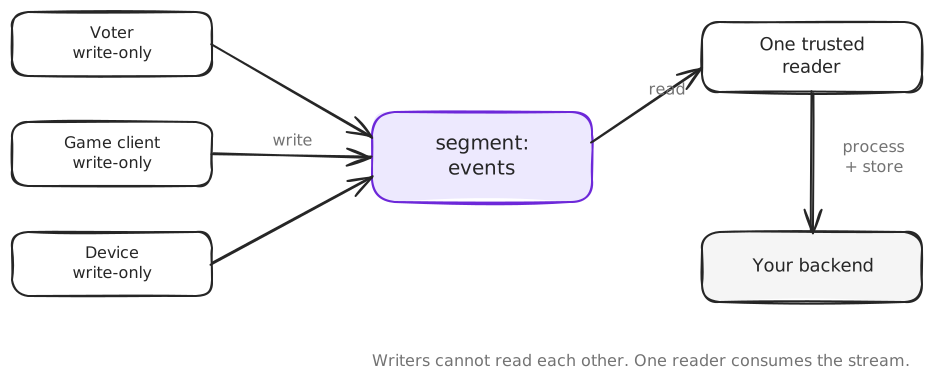
Example 1: Live polls
Think of a live poll in an online event. Each viewer sends one vote to the votes segment of the poll-42 channel.
Viewers must be able to publish a vote. They must not read the votes of other viewers. A vote can be private, and early results can change the votes that come later.
Your server reads the votes segment and counts the votes. Then it publishes the totals to a second segment, results. Viewers have read-only access to results.
Example 2: Multiplayer games
Think of an online poker game. Each player sends actions to the actions segment of the game-456 channel.
Players must be able to publish actions such as FOLD, CALL, or RAISE. They must not subscribe to the actions segment, because it contains the raw actions of all players.
The game server reads those actions and makes sure that the rules permit each action. It updates the game state. Then it publishes the permitted information to a second segment, state.
With this design, a player cannot read an action that the server did not process, or an action that is private. The server controls the time at which it shows information, and it controls the information that it shows.
Example 3: Application telemetry
A developer who uses Celeris can publish client events to the telemetry segment of the app-production channel.
Thousands of browser clients can publish error reports, performance metrics, and interaction events.
Those clients must not be able to subscribe to that segment and read the telemetry of other users. That data can contain sensitive information.
Only authorized backend consumers have read access.
How to set it up
The permissions are in the credentials that your server signs. This is the game from Example 2. A player can write to actions and read from state:
const playerCredentials = signer.sign({
  channels: { kind: "restricted", references: ["game-456"] },
  permissions: {
    kind: "restricted",
    segments: [
      { segmentId: "actions", read: false, write: true },
      { segmentId: "state", read: true, write: false },
    ],
  },
  reference: player.realtimeReference,
  replay: false,
  allowEcho: false,
});
The game server has the opposite access. It can read from actions and write to state:
const serverCredentials = signer.sign({
  channels: { kind: "restricted", references: ["game-456"] },
  permissions: {
    kind: "restricted",
    segments: [
      { segmentId: "actions", read: true, write: false },
      { segmentId: "state", read: false, write: true },
    ],
  },
  reference: "game-server",
  replay: false,
  allowEcho: false,
});
In the browser, the player subscribes to state and publishes to actions:
import { readText, textPayload } from "@useceleris/client";

const channel = client.channel("game-456");
const actions = channel.segment("actions");
const state = channel.segment("state");

// showGameState is a function of your application.
state.onMessage((payload) => showGameState(readText(payload)));
state.subscribe();
await channel.connect();

await actions.publish({ payload: textPayload("RAISE 200") });
If the player calls actions.subscribe(), the server sends a PermissionDeniedError. The error names the SUB command and the actions segment. The connection stays open, and the player can continue to publish.
A channel reference contains only letters, digits, hyphens, and underscores. A segment name is more flexible. Thus, use the channel for the game, and use the segments for the different streams of that game.
A checklist for your permissions
- Start with no access. Use a restricted list of segments.
- Give
writefor a segment where the client sends data. - Give
readfor a segment where the client gets data. - Put the data that clients send and the data that clients get in different segments.
- Select the access on your server for each user. Do not use a segment list that the client supplies.
For the full rules, read Permissions in the documentation.