Permissions
This page explains how read access and write access to a segment control what a connection can do.
Before you start: Read Channels and Segments. Your server signs the credentials for each connection. See Authentication.
1. Know what a permission is
A permission gives a connection access to one segment. Each permission has two flags, read and write. Each flag operates independently of the other.
readlets the connection subscribe to the segment and use its presence.writelets the connection publish to the segment.
Your server sets the flags when it signs the credentials. The client cannot change them. The Celeris server applies the flags to each command that the connection sends.
2. Give access to all segments or to a list
The permissions claim has two forms.
// The same access for all segments of the channel.
const permissions = { kind: "all", read: true, write: false };
// Access for the segments in the list. All other segments have no access.
const permissions = {
  kind: "restricted",
  segments: [
    { segmentId: "actions", read: false, write: true },
    { segmentId: "state", read: true, write: false },
  ],
};
Use the restricted form by default. A segment that is not in the list has no access. An empty list gives no access. It does not mean "all".
3. See what each access level can do
| Access in the claims | subscribe() | publish() | Presence (subscribe and list) |
|---|---|---|---|
| Read and write | Accepted. The connection receives messages | Accepted | Accepted |
| Read only | Accepted. The connection receives messages | Refused | Accepted |
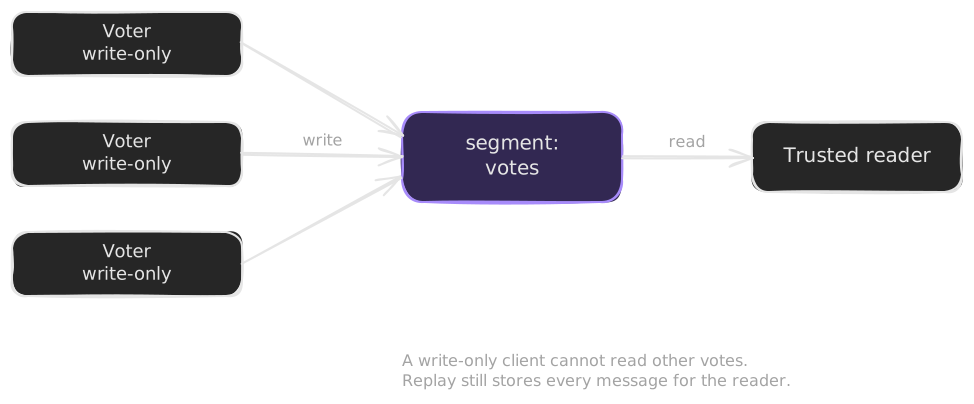
| Write only | Refused | Accepted | Refused |
| Segment not in the claims | Refused | Refused | Refused |
For each refused command, the server sends a PermissionDeniedError. The error names the command and the segment. The connection stays open.
publish() resolves when the SDK gives the bytes to the socket. Thus, a refused publish resolves first. Its error comes later through the error listener.
4. Subscribe to receive
A publish does not subscribe. When a connection publishes to a segment, the server sends the message to the subscribers of that segment. The server does not add the publisher to the segment.
To receive messages from a named segment, call subscribe().
const chat = channel.segment("chat");

// This publish sends a message. It does not make the connection a subscriber.
await chat.publish({ payload: textPayload("hello") });

// This subscription lets the connection receive messages from "chat".
const membership = chat.subscribe();
This rule also applies to your own messages. When allowEcho is true, the connection receives its own publish only while it holds a subscription to that segment.
A connection that only publishes to a segment does not show in the presence of that segment.
The server keeps each published message for replay, also when no connection is subscribed to the segment. Thus, a message from a write-only connection is not lost. A connection that subscribes later, with replay in its credentials, receives it.
5. Use the default segment
Each connection joins the default segment when it connects. Thus, you do not call subscribe() for default. The permissions apply to default as they do to all other segments:
- With
read, the connection receives the messages ofdefault. - With
write, the connection can publish todefault. - If the claims do not list
default, the connection receives nothing on it. The server refuses a publish to it.
6. Plan the permissions of your application
- Start with no access. Use
kind: "restricted"and an explicit list. - Give
writefor a segment where the client sends data. - Give
readfor a segment where the client gets data. - Put the data that clients send and the data that clients get in different segments.
- Select the access on your server for each user. Do not use a segment list that the client supplies.
With step 4, a client can send data that it cannot read. For example, a player in a game publishes moves to actions and receives the game state from state:
// The player sends moves. The player cannot read the moves of other players.
const playerCredentials = signer.sign({
  channels: { kind: "restricted", references: ["game-456"] },
  permissions: {
    kind: "restricted",
    segments: [
      { segmentId: "actions", read: false, write: true },
      { segmentId: "state", read: true, write: false },
    ],
  },
  reference: player.realtimeReference,
  replay: false,
  allowEcho: false,
});
// The game server reads the moves and publishes the state.
const serverCredentials = signer.sign({
  channels: { kind: "restricted", references: ["game-456"] },
  permissions: {
    kind: "restricted",
    segments: [
      { segmentId: "actions", read: true, write: false },
      { segmentId: "state", read: false, write: true },
    ],
  },
  reference: "game-server",
  replay: false,
  allowEcho: false,
});
For more examples of write-only access, see When to Use Write-Only Permissions.
Next: Read Binary Messaging, or sign your first credentials in Authentication.