API Reference
The complete reference for the Celeris client and server packages covers every export, option and type in JavaScript, Python, Go and Java.
Reference overview
The API is deliberately small. Each language has two packages, and each package has one job.
| Reference | Covers |
|---|---|
| Client API | @useceleris/client — connecting, messaging, presence, payload helpers, errors |
| Server API | @useceleris/server — signing credentials, and connecting from a backend |
| Python Client API | useceleris-client — the same client surface for Python's asyncio |
| Python Server API | useceleris-server — signing credentials on a trusted Python server |
| Go Client API | sdk-go-client — the same client surface with Go contexts and errors |
| Go Server API | sdk-go-server — signing credentials on a trusted Go server |
| Java Client API | celeris-client — the same client surface with CompletableFuture and exceptions |
| Java Server API | celeris-server — signing credentials on a trusted Java server |
The Python packages follow the JavaScript ones with Python names (segment_id, presence_list) and asyncio idioms. The behavior, limits and error codes are the same.
The Go modules also follow them, with Go names (SegmentID, PresenceList) and a context.Context on Connect, Publish and PresenceList. You match the returned errors with errors.Is (celeris.ErrTimeout). The behavior, limits and error codes are the same.
The Java artifacts also follow them, with Java names (segmentId, presenceList) and a CompletableFuture from connect, publish and presenceList. They add builders for options and claims. You match unchecked exceptions by code() (ErrorCode.TIMEOUT). The behavior, limits and error codes are the same.
Client versus server
@useceleris/client runs in browsers, Node.js, Bun and Deno. It opens the connection, subscribes to segments, sends and receives messages, and reports presence. It contains no signing code, and it cannot sign credentials.
@useceleris/server belongs only on a trusted backend. It signs fresh credentials from claims your code decides. It depends on the client package for types only. The client package contains no signing facility. Never import the server package into an end-user bundle.
The credential flow
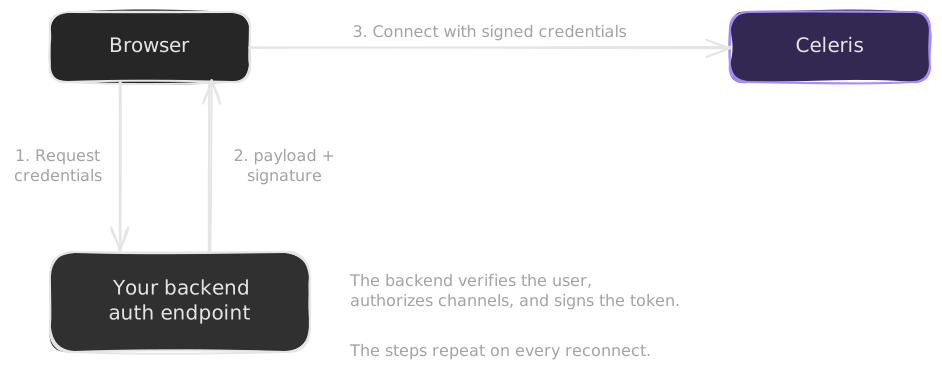
1. Your browser code needs a connection
2. The SDK calls your credentialProvider
3. Your provider asks your backend
4. Your backend authenticates the user, decides their claims, and signs them
5. The signed { payload, signature } goes back to the browser
6. The SDK connects with them
Step 4 is where authorization happens. The browser tells you which channel it wants. Your backend decides whether that is allowed. This flow repeats for every connection attempt and for every reconnect. The SDK calls your provider fresh each time, so you never manage token refresh.
See Authentication for how to scope claims and handle credentials. Reconnection and Recovery explains which failures retry, which subscriptions the SDK restores, and why your application must still reconcile data.