Authentication
Replace the local demo identity with server-verified users, restricted permissions, and fresh credentials.
Start with the Quickstart. This guide explains what must change before you deploy its credential endpoint.
Celeris verifies signed access claims. Your application authenticates the user and decides those claims. A channel name sent by the browser is a request for access, not evidence that access is allowed.
1. Verify the user on your server
Use your application's current session or access-token verification. Do not take a user ID, role, room list, or permission flags from the credential request body.
The flow is:
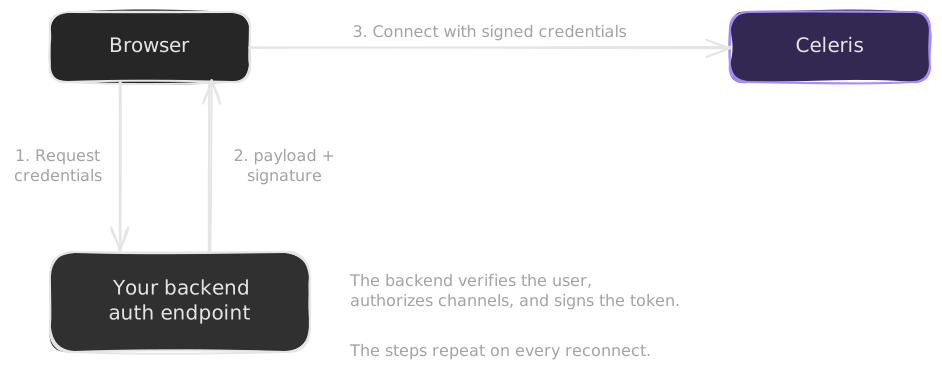
If the session is absent or invalid, return 401. If the user cannot access the requested channel, return 403. Use HTTPS outside local development, your authentication system's CSRF protection, appropriate request-size limits, and rate limits.
2. Sign only authorized access
The code below is an integration pattern, not a standalone server. getUserFromSession, canReadRoom, and canWriteRoom represent your application's verified session and authorization checks. Implement them with server-owned data before you use this handler.
import { createSigner } from "@useceleris/server";

const signer = createSigner({
  clientId: process.env.CELERIS_CLIENT_ID,
  signingSecret: process.env.CELERIS_SIGNING_SECRET,
});

export async function handleCredentials(request) {
  const user = await getUserFromSession(request);
  if (!user) return Response.json({ error: "Sign in first." }, { status: 401 });

  let body;
  try {
    body = await request.json();
  } catch {
    return Response.json({ error: "Invalid JSON." }, { status: 400 });
  }

  const channelReference = body?.channelReference;
  if (
    typeof channelReference !== "string" ||
    !/^[a-zA-Z0-9_-]{1,255}$/.test(channelReference)
  ) {
    return Response.json(
      {
        error:
          "Invalid channel. Use 1–255 ASCII letters, digits, hyphens (-) or underscores (_).",
      },
      { status: 400 },
    );
  }
  if (!(await canReadRoom(user, channelReference))) {
    return Response.json({ error: "Not allowed." }, { status: 403 });
  }

  const mayWrite = await canWriteRoom(user, channelReference);
  const credentials = signer.sign({
    channels: { kind: "restricted", references: [channelReference] },
    permissions: {
      kind: "restricted",
      segments: [{ segmentId: "chat", read: true, write: mayWrite }],
    },
    reference: user.realtimeReference,
    replay: false,
    allowEcho: false,
  });

  return Response.json(credentials, {
    headers: { "cache-control": "no-store" },
  });
}
Use a server-owned, stable realtimeReference that is safe to show to peers. It must not be empty, and it must contain no colon, CR, or LF. Do not use an email address or private account data just because it is convenient.
Configure your framework to limit request-body size. Convert unexpected failures to a generic error response that shows no secrets or claims. The Quickstart already makes sure that the environment values are present. Do the same when your production server starts.
What the claims mean
| Claim | Purpose |
|---|---|
channels | Channel references that this connection can use |
permissions | Segment read/write access |
reference | Identity label peers receive in message metadata and presence |
replay | Recent retained messages to send on segment join: false, true, or a window in milliseconds |
allowEcho | Whether this connection receives its own messages. The default is false. |
Use restricted channels and segments by default. An empty channel-reference list is invalid. An empty restricted segment list grants no segment permissions. Neither means "all."
A channel connection automatically joins the default segment, but membership does not grant read or write access. To use it, include { segmentId: "default", read: true, write: true } in your server-owned segment permissions. Grant only the operations the user needs. The example above grants chat instead, so it does not authorize default-segment messaging.
Read access and write access operate independently. read is necessary for a subscription, and write is necessary for a publish. Thus, a write-only connection can publish and cannot subscribe. A read-only connection can subscribe and cannot publish.
The server applies the segment permissions to each command. It sends a PermissionDeniedError for each command that it refuses, and the connection stays open. See Permissions for the full table and for how to plan the access of your application.
The server refuses a connection, as a Transport error, when the signed payload is not valid JSON, has no timestamp, has a timestamp that is not a number, has a timestamp more than 60 seconds old or in the future, or has an empty reference. Sign the credentials just before the client connects. Do not keep signed credentials for later.
3. Decide whether to allow replay
During recovery the client's credential request includes replayLookbackMs. Your browser provider must forward it to your endpoint if the endpoint needs it:
// Inside the credential provider's fetch options:
body: JSON.stringify({
  channelReference: request.channelReference,
  replayLookbackMs: request.replayLookbackMs,
});
Treat this as untrusted input, just like the requested channel. The server decides whether that user may receive history and how much to request.
For example, after you authorize history access, replace replay: false with this policy:
// Example policy: request at most 30 seconds; this is not a retention guarantee.
const requestedLookback = body.replayLookbackMs;
const replay =
  Number.isInteger(requestedLookback) && requestedLookback > 0
    ? { lookbackMs: Math.min(requestedLookback, 30_000) }
    : false;
Use this replay value in signer.sign(). Users without history permission must still receive replay: false. Never copy the entire request into the claims that you sign.
The server replays retained data per segment join. It keeps at most the last 100 messages of each segment, for at most 2 minutes. A signed lookback does not guarantee that all requested history exists. See Reconnection and Recovery.
4. Fetch fresh credentials for every attempt
The client calls its provider for the first connection and every automatic reconnect. Sign fresh credentials for every request. Do not cache or backdate credentials.
The signer has no expiry-duration option and no automatic revocation API. It does not guarantee a particular short lifetime for a freshly signed credential. A fresh signature does not shorten the acceptance window of the server. A permission check on a new credential request does not revoke a current connection immediately.
Signed credentials are sensitive access material even though they do not reveal your signing secret. A person who holds them can try to use the access they grant. Pass payload and signature through unchanged. Use HTTPS. Return Cache-Control: no-store. Do not log, persist, or share the credentials.
5. Check the production boundary
Before you deploy:
- Replace the fixed demo identity with verified sessions.
- Authorize every requested channel. Choose permissions on the server.
- Keep the signing secret out of browser bundles, mobile bundles, and public environment variables.
- Do not import
@useceleris/serverinto browser code. - Add CSRF protection that matches your session scheme. Add rate limits, body limits, and safe failure responses.
- Decide whether to allow replay. Cap requested history according to your policy.
- Test denied access as well as the successful path.
Next: Read Connection and Lifecycle. For a backend that consumes realtime itself, read Server-side usage.