Channels and Segments
This page explains channel connections, segment streams, and server-authorized membership.
1. Choose a channel reference
A channel reference names a communication space inside your Celeris application, such as orders or room-42. You do not create it in the dashboard first.
In the JavaScript SDK, a channel handle represents one connection:
// Continue after creating client in the Quickstart.
const channel = client.channel("room-42");
A new handle does not open a connection. await channel.connect() opens the socket. Two calls to client.channel("room-42") create two separate handles. When you connect both handles, the SDK opens two sockets, although their reference is the same.
Every successful connection automatically joins the channel's default segment. You do not need to create it or call subscribe() to join it. Access the segment through channel.defaultSegment(). This call is equivalent to channel.segment("default"). That handle does not connect by itself.
A channel reference contains 1 to 255 ASCII letters, digits, hyphens, or underscores.
2. Divide the connection into segments
A segment is a named stream inside the channel. Segments separate related messages that share a connection but have different subscribers or permissions.
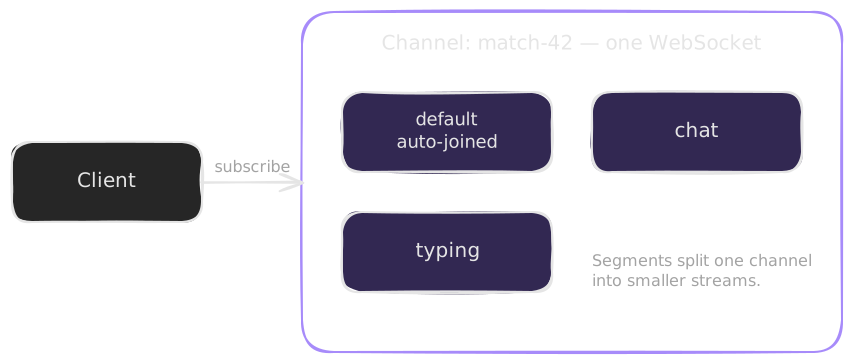
If your channel needs only one stream, use default:
const updates = channel.defaultSegment();
updates is a handle to the stream that you automatically join when channel.connect() succeeds. You receive messages with updates.onMessage(). You send messages with updates.publish(). You do not need an updates.subscribe() call. Your credentials must still grant the appropriate read/write permissions for default.
Add named segments only when you need separate streams:
const chat = channel.segment("chat");
const typing = channel.segment("typing");
Both handles use the same channel socket. The SDK performs no network operations when you obtain a segment handle. A segment join is a real server operation, not only a local filter.
| Example | Channel | Segments |
|---|---|---|
| Single update feed | room-42 | default |
| Chat room | room-42 | chat, typing |
| Game | game-17 | players, spectators |
| Customer dashboard | customer-42 | orders, notifications |
Names are not security boundaries by themselves. Your trusted server must sign the allowed channel references and segment read/write permissions.
3. Listeners and subscriptions
A listener is your local callback. A subscription tells the SDK to maintain interest in the segment's messages. For an additional named segment such as chat, register both. For default, register only the listener. Connection setup already supplies the membership.
import { readText } from "@useceleris/client";

const stopUpdates = updates.onMessage((payload) => {
  console.log("Default stream:", readText(payload));
});

const stopListening = chat.onMessage((payload) => {
  console.log(readText(payload));
});
const membership = chat.subscribe();
await channel.connect();
When you register before you connect, the SDK can restore your interests as part of connection setup. A subscription is not a server acknowledgment. Permission errors arrive separately.
For a default-only setup, keep updates and its listener. Omit the chat listener and subscription. Connect the channel once in either case. The Quickstart credentials allow only demo-room / chat. Before you run these examples, authorize room-42 and the segments that you use on your server.
A message reaches permitted members of its own segment, not every connection in the channel.
4. Understand automatic membership
A connection automatically joins the "default" segment. channel.defaultSegment() is shorthand for channel.segment("default"). You still need read permission to receive messages. Automatic membership does not subscribe to presence.
The default segment is not a wildcard. A message that you publish to chat does not also appear in default. A message that you publish to default does not reach every named segment. See the default-segment example to publish and receive messages on default without an explicit subscription.
A publish does not join the connection to a segment. To receive messages from a named segment, call subscribe(). Read access is necessary for a subscription, and write access is necessary for a publish. See Permissions for the full rules. A presence subscription does not join the segment for messages. To receive the messages of all segments of the connection in one listener, use channel.events().onMessage().
Multiple handles for the same segment share the channel's listeners and interest counts. When you cancel one subscription, another caller's interest remains. The default segment is never remotely unsubscribed.
5. Release what you own
stopUpdates(); // Remove the default stream's callback.
stopListening(); // Remove this callback.
membership.cancel(); // Release this subscription.
await channel.close(); // Finish with the whole connection.
close() also closes every segment handle on that channel. Create a new channel if you need a connection after close().
With the default-only setup, cleanup is only stopUpdates() and await channel.close(). There is no subscription handle to cancel.
Next: Read Messaging in JavaScript. Read Reconnection and Recovery to learn how subscriptions continue after an outage.