Message Ordering
This page explains ordered streams, message identity, and application versions.
Celeris preserves the order of messages within a segment from the same origin node. This order also applies when messages travel across regions. The JavaScript SDK calls your message listeners in the order that messages arrive.
For chat, order status, or game state, your application can process the messages of one sender in sequence. Celeris routes those messages to connected subscribers.
How ordering works
An origin node is the Celeris server that first accepts a published message. A publisher's active channel connection sends its messages through that node.
As an example, your backend publishes these messages in sequence to one segment over the same connection:
Order received -> Preparing -> Ready for collection
Celeris preserves that sequence for the delivered messages, whether a subscriber is connected locally or in another region. You do not need to sort that single-origin stream on the client. The same ordering applies to retained messages that Celeris replays from that origin.
| Scope | Ordering behavior |
|---|---|
| One segment, one origin node | Messages retain their order, also across regions |
| One segment, several origin nodes | Each origin's stream retains its order. Messages from different origins can interleave |
| Separate segments | Each is a separate stream. One segment gives related messages a shared ordering scope |
This applies to default as well as named segments. Ordering describes the sequence of delivered messages. See Reconnection and Recovery for the recovery of messages that were sent during a disconnection.
The SDK invokes listeners synchronously. If a listener starts asynchronous work, that work can finish out of order. Apply simple interface changes directly in the listener. Serialize asynchronous work when the completion order matters.
Coordinate messages from multiple publishers
Independent publishers can publish to the same segment concurrently. If they connect through different origin nodes, Celeris preserves each origin's sequence. Celeris does not impose a single global order between the origins.
For example, these are two valid ways to receive concurrent streams:
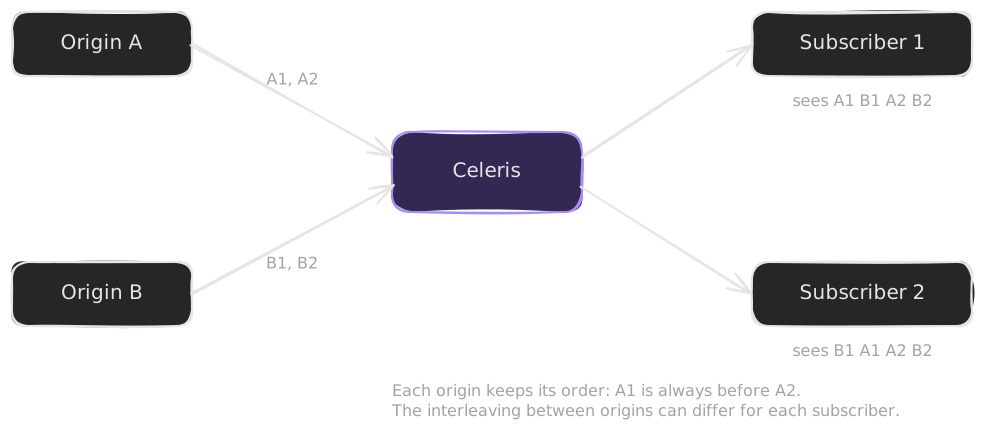
Both subscribers receive A1 before A2, and B1 before B2. The order between the two streams can differ for each subscriber.
For messages about shared business state, include a version from the backend that owns that state:
{
  "orderId": "order-42",
  "version": 18,
  "status": "ready"
}
Store the latest version together with the displayed order. Apply a newer complete snapshot. Ignore an older snapshot. If messages contain incremental changes and a version is absent, fetch the current state from your API before you continue. Your database or the service that owns the state assigns these versions. The versions are application data, not Celeris message metadata.
This keeps the responsibilities clear. Celeris delivers the live stream. Your application decides which message represents the current business state.
Identify messages consistently
Every delivered message includes a messageId. Supply your own ID at publish time to correlate a message with your application. You can also let Celeris assign one.
The JavaScript SDK uses these IDs to filter duplicates within its most recent 1,024 IDs per channel. Use one ID per logical message. Different messages must have different IDs.
A message ID identifies one message. An application version describes the position of that change in your business state. Treat them separately. IDs are not sequence numbers or replay cursors. For durable operations such as payments, also keep idempotency in your own backend.
Continue after a disconnection
After an established connection drops, the SDK automatically attempts to reconnect. It obtains fresh credentials and restores held subscriptions. Your listeners remain registered. When your server authorizes replay, Celeris can deliver retained messages to help the application catch up.
For a live dashboard, use the recovery event to refresh the current state from your API. Then continue with the live messages. This combines recent-message replay with an authoritative snapshot when the outage extends beyond retained history. Replay is bounded, so applications must prepare for possible gaps and duplicates.
See Reconnection and Recovery for the recovery lifecycle and replay policy. For the distinction between local publish completion and remote delivery, see Publishing messages.
Next: Read Reconnection and Recovery.